Loading Recent Macro Script Files Easily and Quickly
When you want to load recently used macro script files (`.mamc`), you can use the Windows Taskbar jump list feature for quick access. Right-click the Auto Mouse Click icon in the Taskbar to view your recently opened scripts, as shown in the screenshot below. You can also pin the application icon to your taskbar for one-click access.
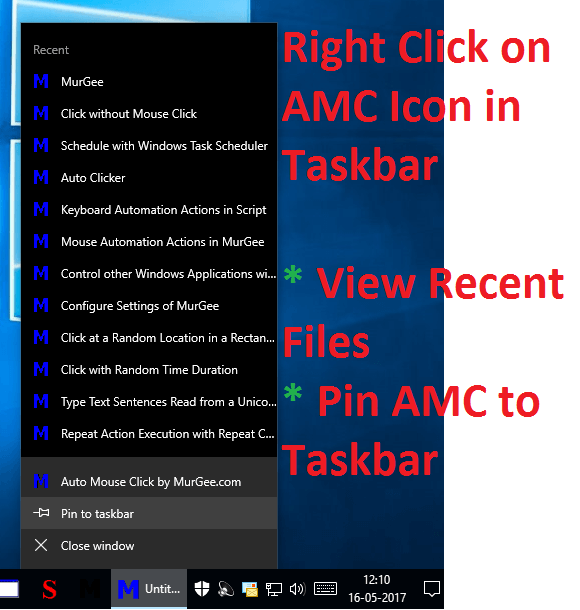
You can manage your recent files directly from the Taskbar jump list. Right-clicking any recent script file name in the jump list menu allows you to open, edit, or execute the macro script directly without launching the editor first. Taskbar jump lists and file pinning are supported across Windows 11, Windows 10, and Windows 8.1.
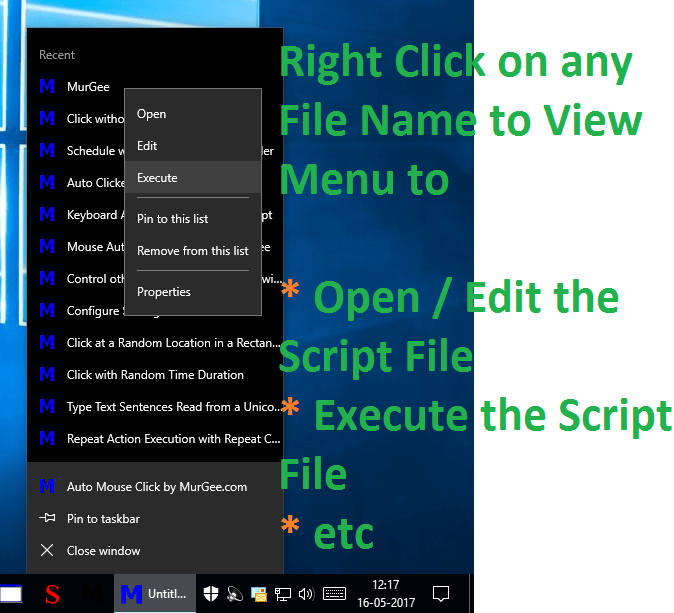
When you pin the application icon to your taskbar, you can reposition it anywhere along the taskbar for convenient access. Right-clicking the taskbar icon displays your most recent script files, allowing you to open or edit selected scripts, pin specific scripts to the list so they remain permanently accessible, and inspect file properties such as location, file size, and creation date for `.mamc` script files.